Lead and referral sources are essential for tracking, pricing, compensation and relationship management. In Charlie, these sources can be easily acce
Instructions to View Lead and Referral Sources
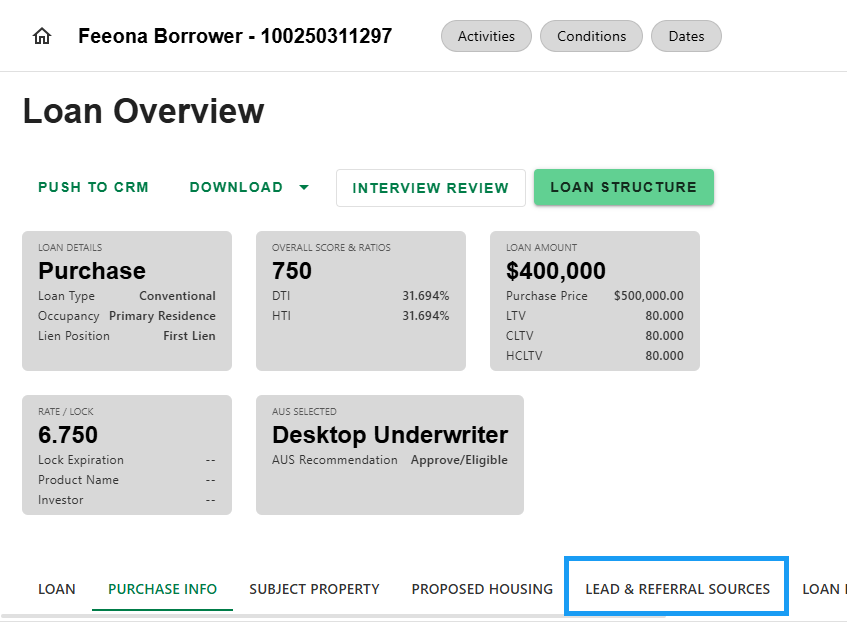
Step 1: Navigate to Loan Overview
- Loan Overview is the landing page when logging into a loan. It also can be accessed from anywhere in the loan. Simply click the 'Back to Loan Overview' button on the top of the screen.

Step 2: Select Lead & Referral Sources Tab
- Once on Loan Overview, select the 'Lead & Referral Sources' tab.
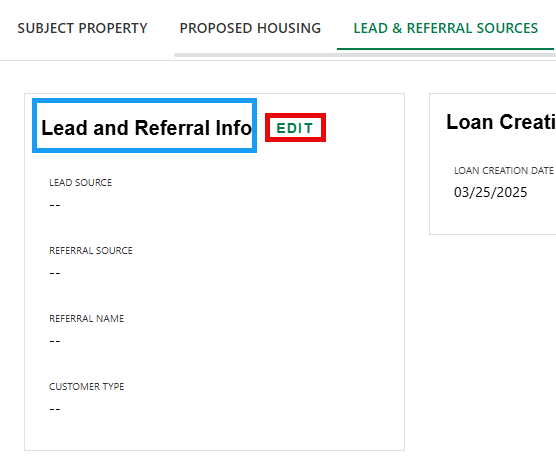
Step 3: View/Edit Lead & Referral Sources
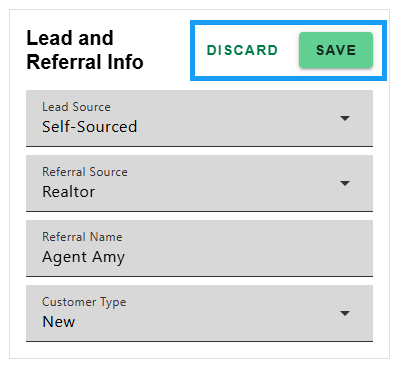
- View Lead Source, Referral Source, Referral Name and Customer Type in the Lead and Referral Info section. Click 'EDIT' to update selection. Select 'SAVE' to apply changes or 'DISCARD' to cancel.
Once certain actions are completed, for instance generating disclosures or locking the interest rate, the lead source may become fixed and can no longer be changed. Refer to your company policy or reach out to your manager for guidance.
Was this article helpful?
That’s Great!
Thank you for your feedback
Sorry! We couldn't be helpful
Thank you for your feedback
Feedback sent
We appreciate your effort and will try to fix the article