The Loan Overview screen is accessible at all times to authorized users, providing a summary of the loan details. Users can navigate to the Government Loan tab to review essential information in a centralized location.
How to See Government Loan Details
Step 1: Access the Loan Overview Screen
- Access the Loan Overview landing page from anywhere in the loan by clicking the 'Back to Loan Overview' chip at the top of the screen.

Step 2: Populate the content in the template
- Click on the GOVERNMENT tab to view the details. The screen will dynamically appear and change based on the Loan Type.
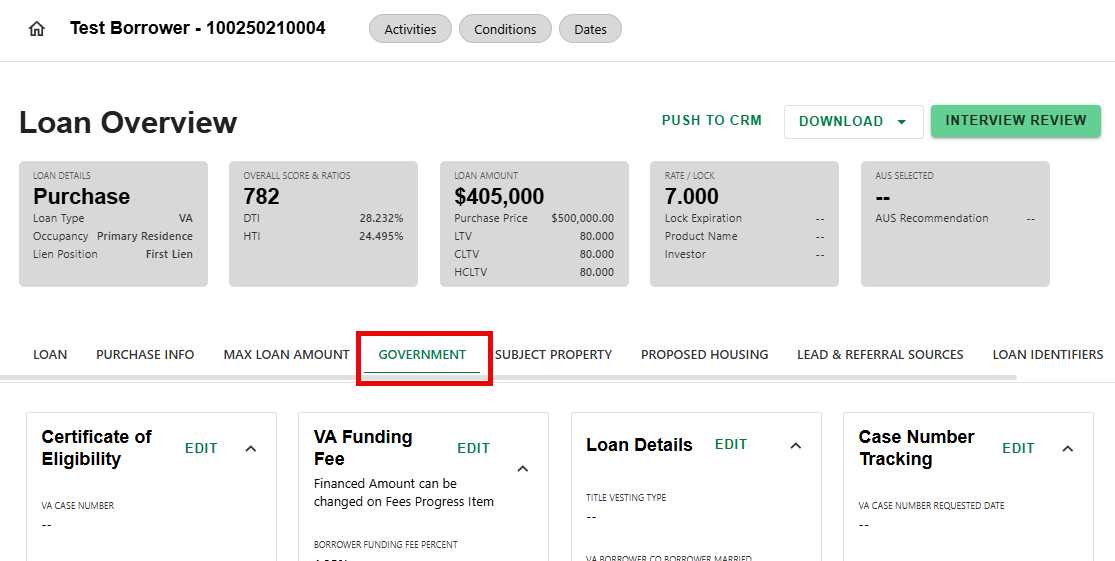
This tab provides loan level government loan detail. Each Borrower detail screen also has a dynamic, dedicated Gov't Loan section.
Was this article helpful?
That’s Great!
Thank you for your feedback
Sorry! We couldn't be helpful
Thank you for your feedback
Feedback sent
We appreciate your effort and will try to fix the article