Build Your Own Report - Enhancements
1. Charlie's enhanced reporting tools now let you narrow down results by date, so you see what matters most.

2. If a report contains one or more dates, you can apply filters with a few easy steps: Start by selecting the desired date type.

3. Next, choose the date range criteria and the corresponding date.
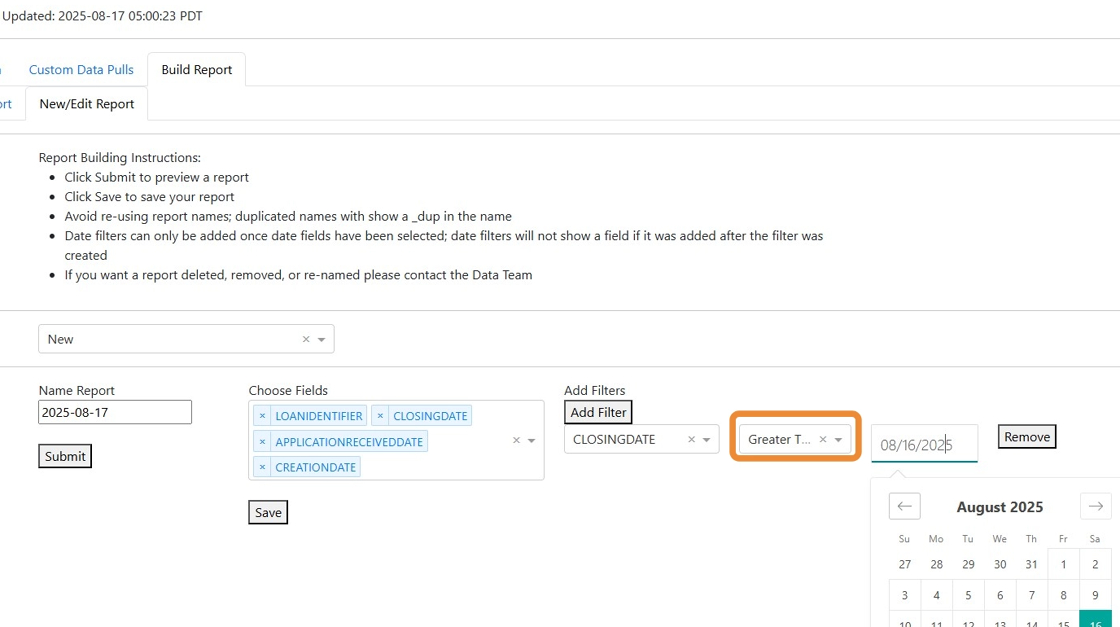
4. Click 'Submit', and the updated report will generate with results matching your selected filters.

5. Additional date filters can be added to drill down even further.
Dates are just the first step in filtering capabilities for managing reports in Charlie. More fields will soon be available to filter.

6. Also included in the August release, is the identification of duplicate reports. if a new report is created and given the same name as an existing report,

7. it will automatically be saved with "dup" appearing at the end of the name. This prevents accidentally overwriting existing versions and allows the user to rename the report.

Was this article helpful?
That’s Great!
Thank you for your feedback
Sorry! We couldn't be helpful
Thank you for your feedback
Feedback sent
We appreciate your effort and will try to fix the article