Activity Automation > Order Checklists
1. The November release brings new automation that streamlines ordering workflows by generating activities automatically whenever an order is needed.

2. When a Progress Item moves into a Needs Order status, indicated by the red alert icon. Charlie automatically generates the related checklist.

3. At the same time, Charlie now also creates an Order activity, automatically assigning it to the appropriate skillset. This ensures nothing is missed and that the order process begins immediately.
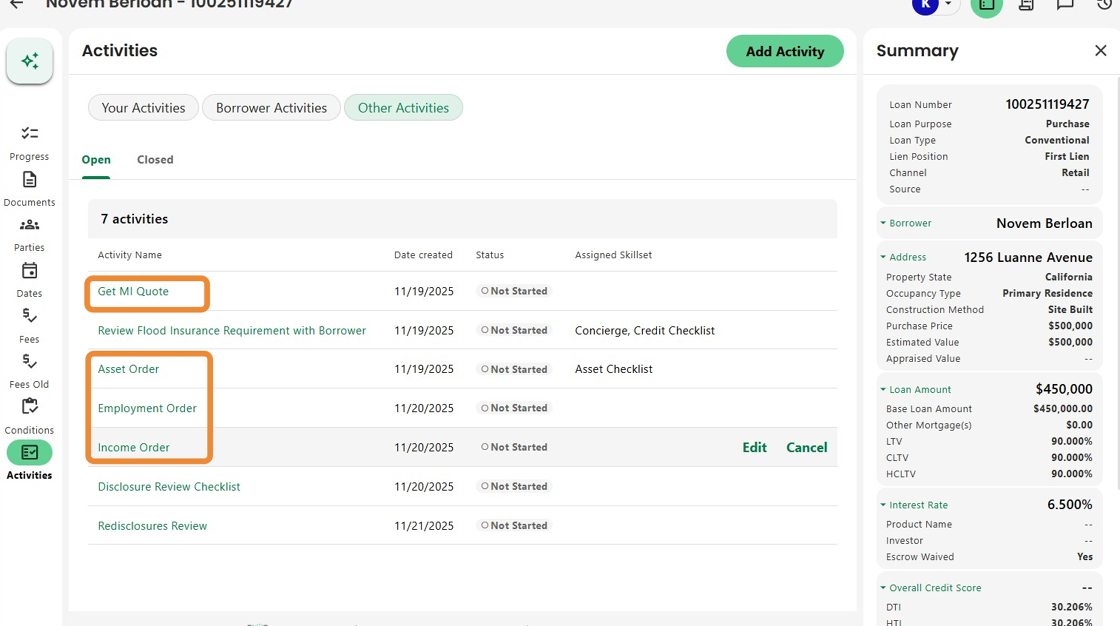
4. Clicking on any order activity takes the user straight into the corresponding checklist, including an Order button, eliminating the need for extra navigation.
These enhancements automate routine tasks, reduce manual steps, and ensure orders are initiated quickly.

Was this article helpful?
That’s Great!
Thank you for your feedback
Sorry! We couldn't be helpful
Thank you for your feedback
Feedback sent
We appreciate your effort and will try to fix the article