How to Search for a Loan
Quickly locate loans in Charlie using borrower name, loan number, category or phase. This guide outlines simple steps to efficient search and filter loans from the loan list.
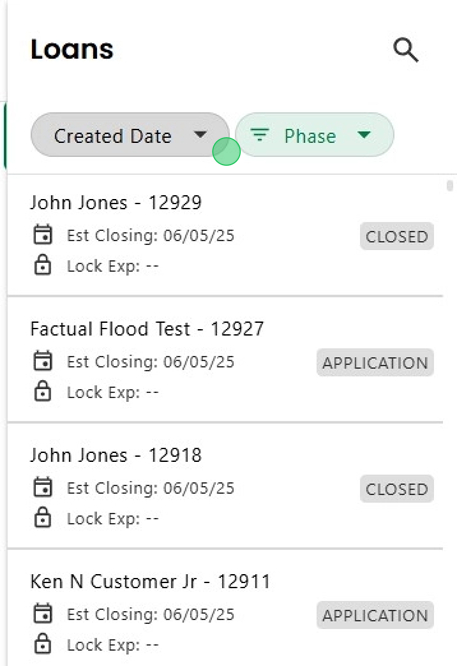
1. Locate the Loan List section on the right side of the main Landing Page. Here all loans you have permission to access are listed. Note: click on the Loan List icon to expand or collapse the section.

2. Click on the magnifying glass in the upper right corner to search by Borrower Name or Loan Number. Entering partial information will display all matching results.

3. Click on the first dropdown to select criteria to sort loans by Category, including key dates and newly uploaded documents.

4. Click on the second dropdown to filter by the loan Phase.

5. Select one or more phases.

6. Then click 'APPLY" to initiate filters or 'CLEAR' to remove the filter entirely.

7. These options can be selected independently or combined to further refine the list.
Was this article helpful?
That’s Great!
Thank you for your feedback
Sorry! We couldn't be helpful
Thank you for your feedback
Feedback sent
We appreciate your effort and will try to fix the article