Lenders can conveniently access a comprehensive report for their company through Charlie's platform.
Instructions to Access Company Report
Step 1: Log into Charlie
- To get started, simply log into your Charlie account.
Step 2: Click on Analytics Icon
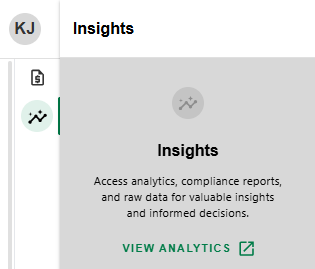
- Once logged in to the home screen, locate and click on the INSIGHTS icon on the side sheet next to the Loan list.

Step 3: Generate Daily Report
- Click VIEW ANALYTICS to instantly generate available reports.
Permission settings ensure that only authorized users can access certain reports, keeping sensitive information secure.
Was this article helpful?
That’s Great!
Thank you for your feedback
Sorry! We couldn't be helpful
Thank you for your feedback
Feedback sent
We appreciate your effort and will try to fix the article