The Fees Progress Item provides a centralized view of all loan-related fess for accurate tracking and management.
Instructions to View Fees
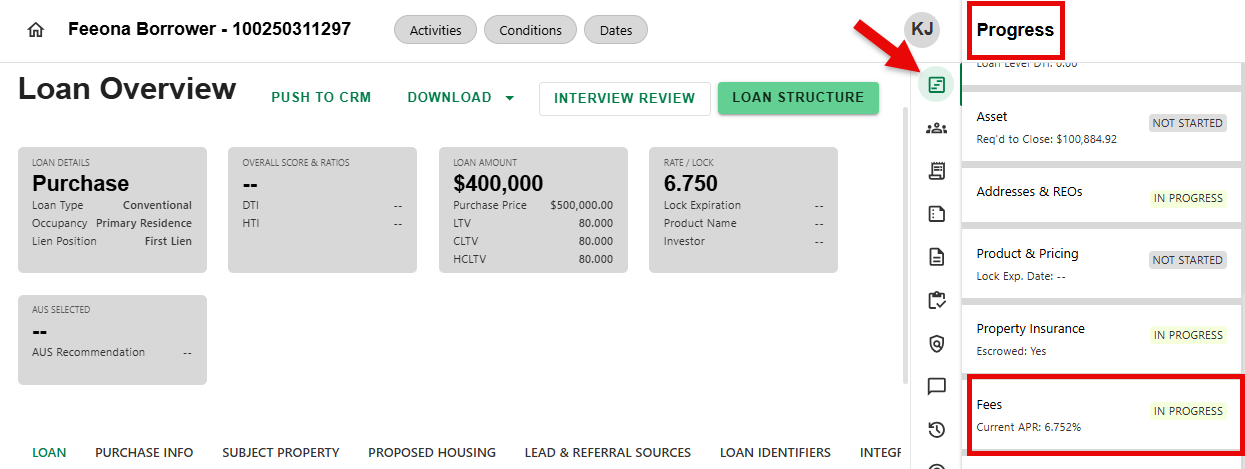
Step 1: Navigate to Fees Progress Item
- From any screen, navigate to the Progress Item sidesheet and select the Fees Progress Item.
Step 2: Review Fee Details
- Within the Fee Details screen, users can:
- View Summary Details
- View and Manage Individual Fees, Prepaids & Escrows, Adjustments & Credits, Origination & Discount
- Compare Last Disclosed Fees
- Request Title Fees
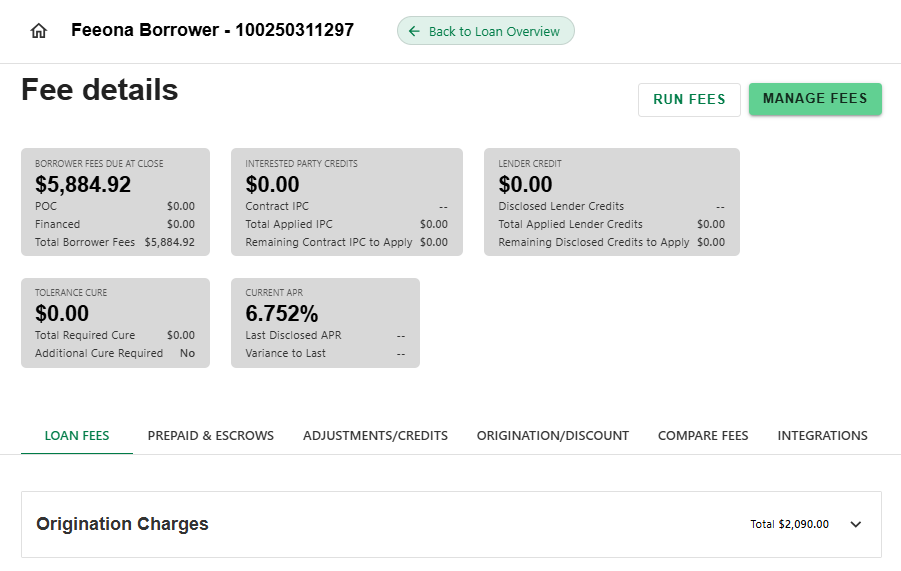
Reference the separate How To articles about each of the individual functions on the Fee Details screen.
Was this article helpful?
That’s Great!
Thank you for your feedback
Sorry! We couldn't be helpful
Thank you for your feedback
Feedback sent
We appreciate your effort and will try to fix the article