Underwriting Review Workflow Enhancements
Providing underwriters with greater clarity and control while elevating checklist usability and improving efficiency.
1. Several improvements have been made to streamline the underwriting workflow, prevent duplicate submissions and guide underwriters through a more intuitive review and decisioning process.

2. This includes updated instructional language to better support document comparison and data accuracy.

3. The underwriting review checklist has been enhanced with new sections, subsections, and green checkmarks as visual indicators of completed items, preventing unnecessary re-underwriting.

4. A new message prompts users that only one open Underwriting Decision Request is allowed at a time.

5. When there is an open Decision Request, the Request Decision button will not be shown as an option for the user to select.
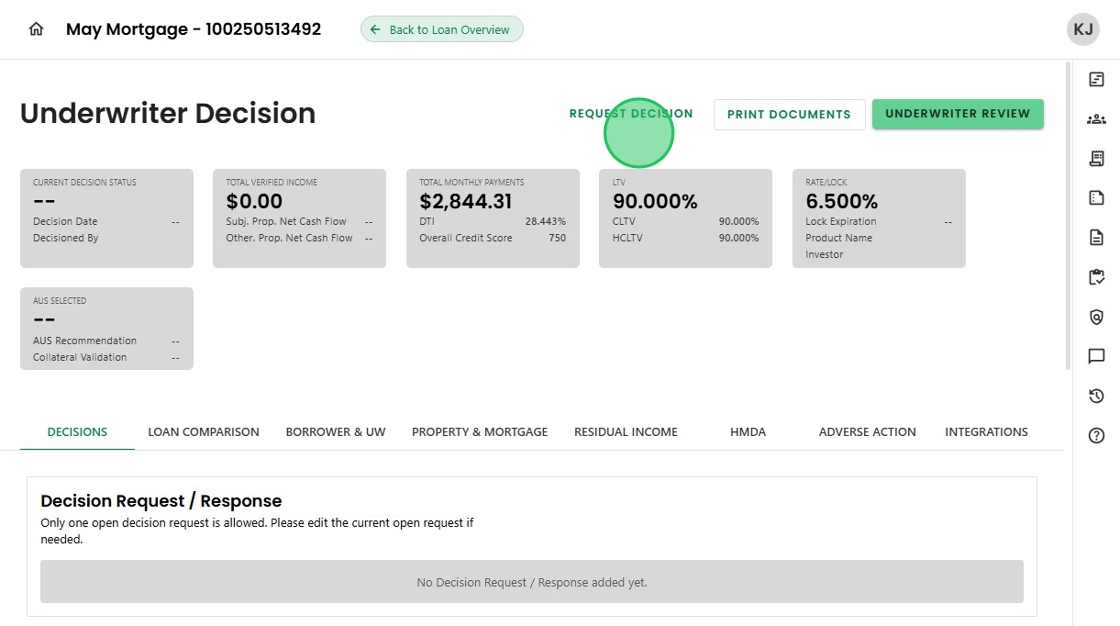
6. Improved wording provides clearer descriptions of actions. 'Send Request' changed to 'Add Activity' or 'Add Condition'.

7. After completion, it clearly states the Condition or Activity was added.

8. There are new Initial Loan and Final Loan Comparison screens.

9. Changes in loan data since the last review are dynamically displayed for quick, at-a-glance reference.

10. A new embedded Transaction Summary updates loan details in real time as the underwriter makes changes within the review workflow.

11. And finally, with a new 'Compliance Test' section, the underwriter can seamlessly conduct compliance checks.

12. With just one click, tests can be run—saving valuable time.

Was this article helpful?
That’s Great!
Thank you for your feedback
Sorry! We couldn't be helpful
Thank you for your feedback
Feedback sent
We appreciate your effort and will try to fix the article