November Parties Updates
1. The November release delivers new ways to manage Brokered Loan and Attorney in Fact party types.

2. To add a new party, select the Parties icon from the left-side panel and click the plus sign.

3. Then select Borrower or Other party from the dropdown.
Let's start by selecting Other to add a wholesale lender for a brokered loan.

4. From the Add a Party list, choose Lender.

5. A new field appears — the Brokered Out indicator — allowing the user to specify if the loan is being brokered.

6. When toggled to Yes, the Party Legal Entity Name field opens to capture the name of the wholesale lender.
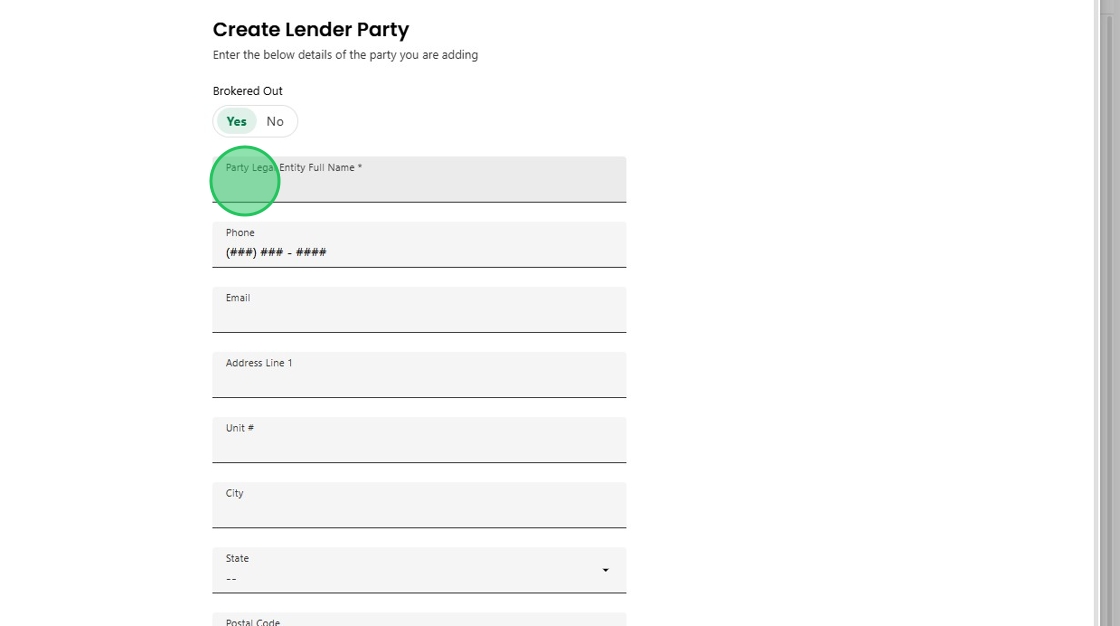
7. This indicator automatically links to the Channel section on the Loan Overview screen.
Once updated, the Brokered Out status is reflected throughout the loan, including key integrations like MI quote ordering.

8. Charlie now also supports Attorney in Fact as a new party type.

9. When the attorney in fact screen displays, there is the option to associate which borrower is using the Power of Attorney.

10. Once added and saved, this information automatically flows to all relevant areas, including title, underwriting, and closing reviews. This allows for triggering related activities, generating the correct signature line on documents and ensuring full visibility throughout the workflow.

11. And finally, you will see both new party types, Brokered Lender and Attorney in Fact, neatly listed in the Parties side panel.

12. The November release also updates the Real Estate Agent party types.

13. To eliminate confusion, the agent selections have been updated from Listing and Selling to Buyer’s Agent and Seller’s Agent.

Was this article helpful?
That’s Great!
Thank you for your feedback
Sorry! We couldn't be helpful
Thank you for your feedback
Feedback sent
We appreciate your effort and will try to fix the article