Quick Access & Document Views
1. The November release introduces enhancements focused on speed, simplicity, and a cleaner workspace
From any of the primary screens in Charlie, users will now see a Quick Actions button.

2. The Quick Actions menu provides one-click access to the most common tools, like structuring a loan, adding a party, or uploading a document, with more shortcuts coming soon.

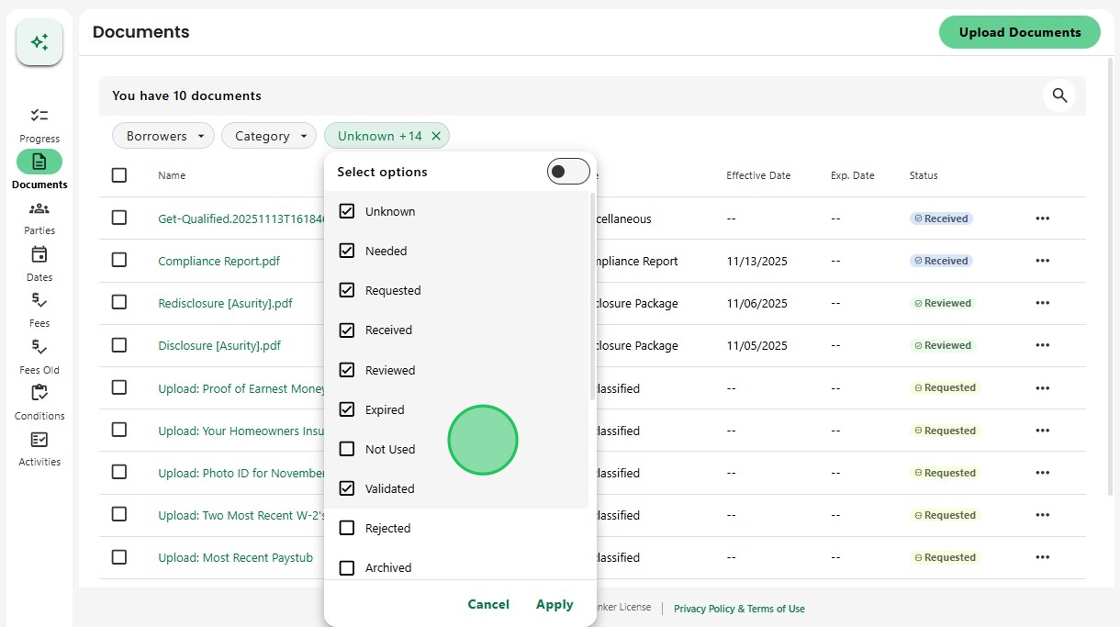
3. Next, to make document management faster, Charlie now hides archived, unused, and rejected documents by default, so only the files that matter the most are displayed.

4. To filter for those hidden items, simply toggle the status filter to the deselect all position.
Then check the desired option(s) and click Apply.

5. Now the list only shows documents from the selected category.

6. And don’t worry. Whenever you navigate to another part of the loan and come back, the default filters automatically reset, keeping the workspace consistent every time.
Was this article helpful?
That’s Great!
Thank you for your feedback
Sorry! We couldn't be helpful
Thank you for your feedback
Feedback sent
We appreciate your effort and will try to fix the article