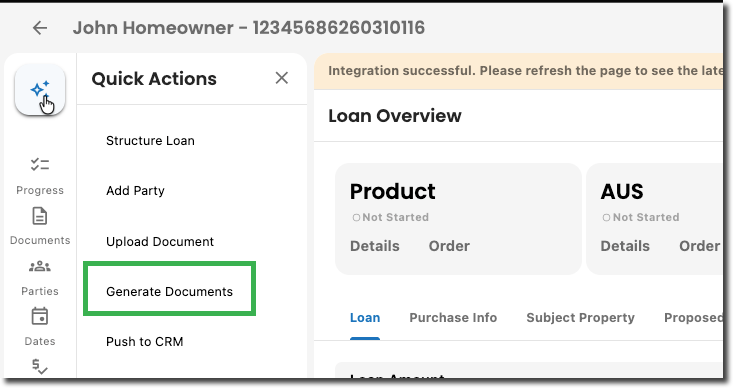
1. Open Generate Documents
Go to your loan file click Quick Actions:
? Generate Documents
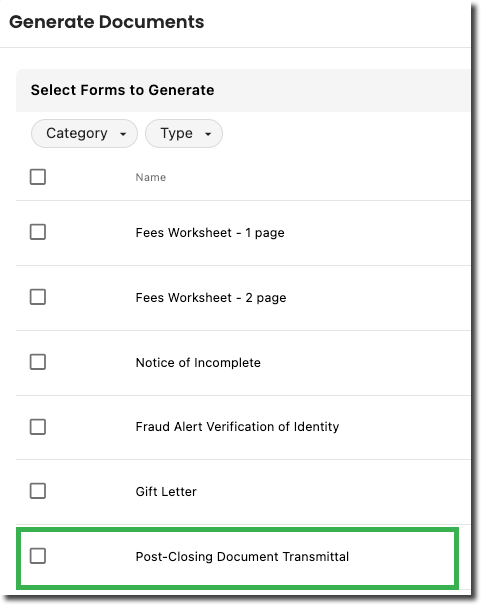
2. Select the Form
Scroll to the bottom and choose:
? Post-Closing Document Transmittal
3. Click Generate Form
4. Confirmation
If successful:
Document is saved in Documents
You’ll see: ✅ Success notification
If there’s an issue:
You’ll see: ⚠️ Error notification
Try again or review missing information
Pro Tip
If you don’t see the option:
Double-check the loan is in Closed status
Make sure all the appropriate Parties are on the loan
The option only appears at that stage and will generate with information from parties.
Was this article helpful?
That’s Great!
Thank you for your feedback
Sorry! We couldn't be helpful
Thank you for your feedback
Feedback sent
We appreciate your effort and will try to fix the article