Income and Employment
Reorganization of the way income and employment data is displayed.
1. Income details are now presented in a consolidated view across all relevant displays in Charlie.
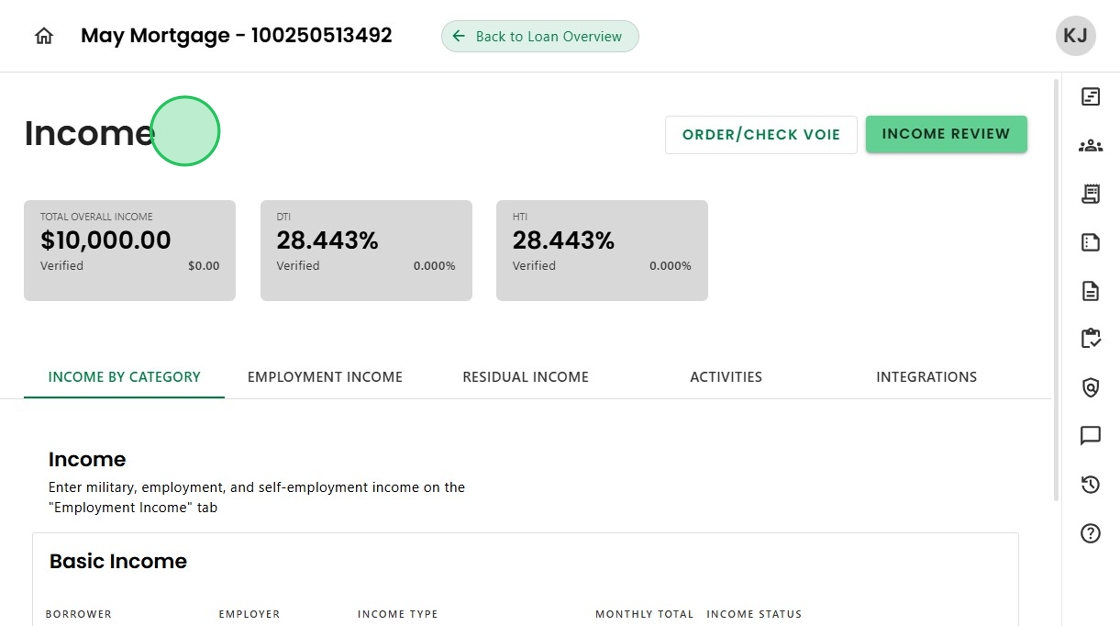
2. The newly added "Income by Category" section shows income amounts for each category, displaying only those that are applicable to the loan.

3. There are also new dedicated sections for Employment related and Residual Income.

4. Verification statuses for both income and employment are visible to provide a complete picture.

5. The ability to 'Archive' income without deleting is now possible.

6. By selecting 'Archived' as the Status,

7. The income is removed from the totals. The data is preserved for future use if needed.

8. By updating the Status back to an active state,

9. The income reappears automatically with no need to re-enter the information.

10. And finally, the Employment Progress Item is now dedicated to Verifications and Activities,

11. As is the Employment Review Advanced Activity to support a more focused approach.

Was this article helpful?
That’s Great!
Thank you for your feedback
Sorry! We couldn't be helpful
Thank you for your feedback
Feedback sent
We appreciate your effort and will try to fix the article