The last disclosed APR should update automatically, but in the event it needs to be updated manually, permissioned users can edit.
Instructions to Update Last Disclosed APR
- Step 1: Navigate to Disclosures Progress Item
- Step 2: Select TRID Dates Tab
- Step 3: Edit Last Disclosed APR
Step 1: Navigate to Disclosures Progress Item
- From any screen, navigate to the Progress Item sidesheet and select the Disclosures Progress Item.

Step 2: Select TRID DATES Tab
- On the Disclosures detail screen, select the 'TRID DATES' tab.
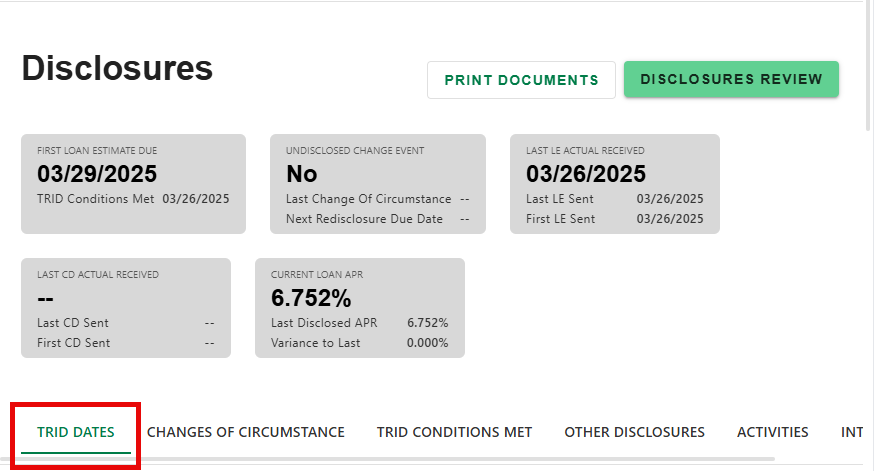
Step 3: Edit Last Disclosed APR
- Click 'EDIT' in the applicable Last Loan Estimate or Last Closing Disclosure section (based on last disclosure sent).
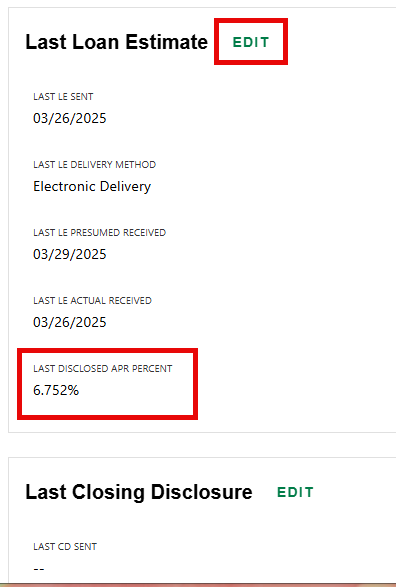
- Enter the new percent. Click 'SAVE' to apply changes or 'DISCARD' to cancel.
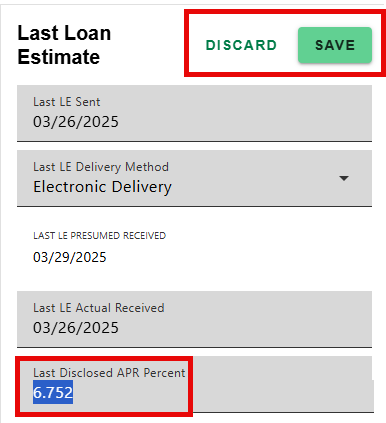
The new Last Disclosed APR will populate in the Info Cards on the Disclosure and Fees Progress Item detail screens and the variance will recalculate.
Was this article helpful?
That’s Great!
Thank you for your feedback
Sorry! We couldn't be helpful
Thank you for your feedback
Feedback sent
We appreciate your effort and will try to fix the article